A chart built for a report and a chart built for a room are two different objects. Confusing the two is one of the most expensive mistakes in data communication, and the evidence for that goes well beyond opinion.
Most people learn to make charts in a context where the reader controls the clock. A spreadsheet, a dashboard, a PDF report. The reader can zoom in, re-read the axis labels, hover over a tooltip, and sit with a dense figure for as long as curiosity lasts. Charts made for that world are built to reward inspection. More series, more precision, more annotation, all of it fine, because the reader can take their time.
A presentation is the opposite situation. You control the clock, the audience does not. A slide appears, your voice competes with it for attention, and a few seconds later you move on. The audience cannot pause reality. And yet the single most common thing presenters do is take a chart that was designed for patient inspection and paste it, unchanged, onto a slide where nobody has time to inspect anything.
A report chart is read. A presentation chart is glanced at while someone talks over it. Those are not small differences in degree. They are different jobs.
This is not a style preference. It runs into hard limits of human attention and memory that have been measured repeatedly. Once you see the numbers, the design rules stop feeling arbitrary and start feeling like physics.
THE EVIDENCEThe audience has far less bandwidth than you think
Working memory, the mental workbench where a viewer actually holds and manipulates what they see, is tiny. Classic recall research puts the span at roughly six to seven items before new information starts pushing old information out. Cognitive Load Theory, the framework most multimedia-learning research is built on, separates the useful load of the content itself from the extraneous load created by poor presentation design. A cluttered slide spends the viewer's scarce capacity on decoding the chart instead of understanding the point.
It gets worse the moment you open your mouth. A well-documented effect in multimedia learning is the redundancy effect: when a presenter narrates while the audience also tries to read dense on-screen text, the visual and auditory channels collide and comprehension drops. You are not reinforcing your message. You are splitting the audience's processor in half.
6-7 Items the average person can hold in working memory before overflow sets in
~8 sec - Silent reading time an average text-heavy slide actually warrants
238 wpm - Average adult silent reading speed for non-fiction, per Brysbaert's 2019 meta-analysis
That reading speed has a brutal consequence for slide text. At 238 words per minute, a viewer needs almost ten seconds to silently read a 40-word slide, and twenty-five seconds for a 100-word one. A glance in a live room is about three seconds. The chart below shows how quickly on-slide text outruns the attention you actually have.
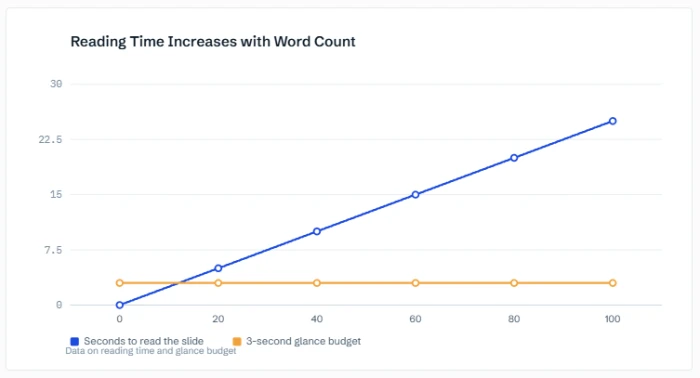
Fig 1 — Text on a slide vs the glance you getlower line is the budget
Reading time modeled at 238 words per minute (Brysbaert 2019). The flat line is a realistic three-second glance. Everything above it is text the room will never finish.
Now the upside, because the same research that explains the failure also points to the fix. Communication studies summarized by presentation firm Ethos3 found that information delivered by speech alone is recalled at about 10 percent after three days, while the same information paired with a relevant visual is recalled at roughly 65 percent. A well-chosen visual is not decoration. It is the difference between a message that survives the week and one that evaporates by lunch.
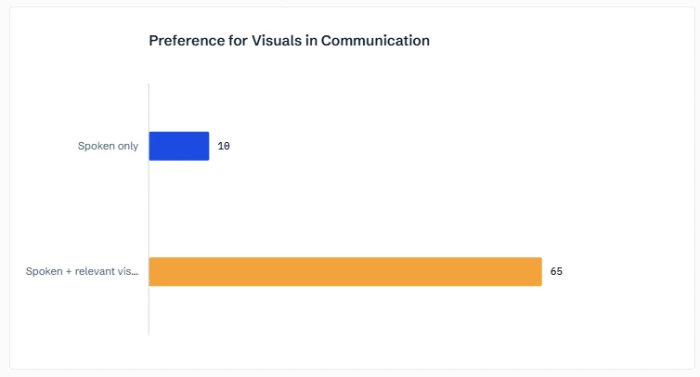
Fig 2 — Recall after three dayshigher is better
One accent color, two bars, numbers sitting on the data. This is a presentation chart: the point is legible in under two seconds.
THE SHIFTWhat actually changes when a chart goes on a slide
The reframe is simple. In a report, the chart answers many possible questions. On a slide, the chart answers one question, the one you are saying out loud right now. Everything that does not serve that single question is competing with it. As Harvard Business Review senior editor Scott Berinato argues in Visualizations That Really Work, the first job is deciding whether you are declaring a point or exploring data, because the two call for completely different charts.
Tufte's idea of the data-ink ratio, the share of a chart's ink that actually encodes data versus the share spent on grids, borders, and decoration, is useful here but needs translation for a room. In a report you maximize information density. In a presentation you maximize time-to-understanding. Sometimes that means stripping ink. Sometimes it means adding a single bold label or a direct annotation that a report would consider redundant. The target is not minimalism for its own sake. The target is a viewer who gets it before you finish your sentence.
This connects to pre-attentive processing, the way the visual system registers certain features, color, position, size, before conscious attention kicks in. A report lets the reader hunt for the key value. A presentation chart should hand it over. Gray out every series except the one that matters. Put the number directly on the bar. Use one accent color and mean it. Below is the exact same dataset rendered two ways.
Fig 3 — Same data, two jobsread vs glance
Report chart
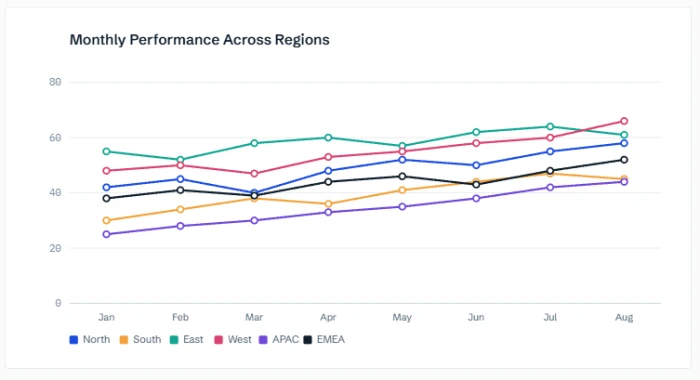
Six series, full grid, legend required. Rewards a patient reader. Fails a three-second glance.
Presentation chart
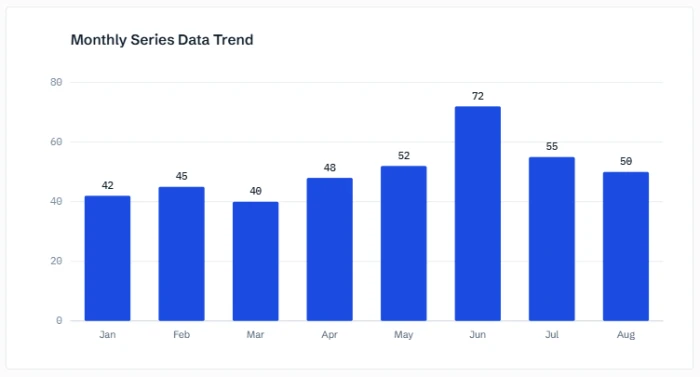
Same numbers, one story. A single bar carries the message, labeled directly. The eye lands where your voice is pointing.
Nothing was faked or hidden. The right-hand version simply decides, on the viewer's behalf, what the chart is for.
THE EVIDENCE IN THE WILDThree case studies where the medium decided the outcome
These principles sound like polish. They are not. When the stakes are high enough, the gap between a report chart and a decision chart stops being cosmetic and starts changing what people do. Here are three well-documented cases, two cautionary and one constructive.
CASE 1 Challenger: the right data, the wrong arrangement Failure
Before the 1986 Challenger launch, NASA engineers already held data showing that the shuttle's rubber O-rings sealed poorly in cold weather. The problem was not missing information. It was how the information was laid out.
As Tufte later documented, the O-ring damage charts that reached decision makers were organized by launch date rather than by temperature, the one variable that actually drove the risk. Arranged that way, the deadly pattern was almost invisible. Replot the same figures with temperature on the horizontal axis, as Tufte did afterward, and the correlation between cold mornings and O-ring failure becomes vivid. Launch day was forecast near 36 degrees, well below the point where damage became likely.
The lessonA chart organized for record-keeping is not organized for a decision. Presentation thinking asks one question first: what is the single variable this audience needs to act on, and is it the thing the eye lands on?
CASE 2 Columbia: a life-or-death finding buried in bullet points Failure
In January 2003, with Columbia already in orbit and tile damage under review, engineers presented their analysis to NASA managers across a set of dense PowerPoint slides. One slide in particular became infamous. The critical fact, that the debris which struck the wing was estimated to be hundreds of times larger than anything in the test database, was hidden under layers of nested bullets, shrinking fonts, and jargon.
Tufte noted that the vague word significant appeared five times on a single slide, carrying meanings that ranged from trivial to catastrophic. The actual debris was later estimated at roughly 640 times the size of the test cases. The official Columbia Accident Investigation Board synopsis published by NASA went on to criticize the agency's reliance on slide decks instead of technical reports, concluding that as information moved up the hierarchy, the key qualifications quietly dropped out. The Board called it engineering by viewgraph.
The lessonDepth-of-report content crammed into slide format does not become clearer, it becomes dangerous. If the finding is too important to lose, the medium has to be chosen to protect it, not flatten it.
CASE 3 Amazon: choosing the medium on purpose Constructive
On June 9, 2004, Jeff Bezos sent an internal email banning PowerPoint from senior-team meetings at Amazon. In its place came the six-page narrative memo, written in full sentences, read in silence by everyone in the room for the first twenty to thirty minutes before any discussion begins. Bezos later told CNBC it was one of the smartest things the company ever did.
The move is relevant here precisely because it is not anti-visual. It is pro-fit. Amazon decided that a dense, interconnected argument was the wrong thing to force into bullet points and glance-sized slides, so they used a medium built for patient reading instead. The flip side holds just as firmly: a narrative memo would be a terrible way to deliver a single trend to a distracted room. The discipline is matching the artifact to how it will actually be consumed.
The lessonThe question is never slide versus document in the abstract. It is whether this content will be read or glanced at, and then building the artifact for that reality.
THE PRACTICEA working checklist for the next chart you put on a slide
None of this requires artistic talent. It requires deciding, before you design, what the chart is for. Run a report chart through this before it reaches a room.
- Name the one takeaway. If you cannot say the chart's point in a single sentence, the slide is not ready. Put that sentence in the title, not a label like "Revenue by quarter."
- Grey out the noise. Mute every series, bar, or line except the one your point depends on. Contrast is how you aim the eye.
- Label on the data, not off to the side. Direct labels beat legends. A legend forces a lookup the audience has no time for.
- Cut precision the room cannot use. 38 percent lands. 37.84 percent is report precision that costs reading time and buys nothing on a slide.
- Do not narrate the text on screen. Thanks to the redundancy effect, reading your bullets aloud actively lowers comprehension. Let the visual and your voice do different jobs.
- Test the three-second glance. Show the slide to someone for three seconds, then hide it. If they cannot repeat the point, redesign, do not re-explain.
THE TOOLKITTools that help you build for the room
The thinking matters more than the software, but the right tool makes presentation-first charts faster to produce. These range from hand-tuned editors to AI generators. Use whichever gets you to a clean, single-message chart with the least friction.
Strong defaults for clean, annotation-friendly charts. Easy direct labeling and highlight colors make it a natural fit for glanceable slides.
Great for turning one chart into a simple animated build, revealing the key series on cue instead of dumping everything at once.
Open-source and fully controllable when you need to embed a custom, stripped-down chart in a web-based deck or product demo. The charts in this article are built with it.
Concise grammar-of-graphics approach for analysts who want precise control over exactly what the viewer sees and what gets suppressed.
ChartGPT
Describe the chart you want in plain language and generate it from your data, fast. Handy for drafting a presentation-ready visual and iterating on the single message before you polish.
THE TAKEAWAY Design for the clock you do not control
The core mistake is treating a chart as a fixed object that can be moved between contexts intact. It cannot. The report reader has time and control. The audience in your meeting has neither. When you forget that, you get a Challenger chart sorted by the wrong variable or a Columbia slide that buries the one fact that mattered. When you remember it, you get a slide the room understands before you finish the sentence.
So the next time you are about to drag a figure from a dashboard onto a slide, pause and ask the only question that counts: is this going to be read, or glanced at? Then build the chart for that answer, not the other one.
Presentation charts are not simpler report charts. They are a different medium with different physics, and they reward you for respecting the difference.