
Your before and after data has a story. Your chart is hiding it.
You ran the campaign. You changed the pricing. You launched the new onboarding flow. Now you have two columns of numbers, a "before" and an "after," and a stakeholder who wants the answer in one glance.
So you build a clustered bar chart. Twenty bars. Two colors. A legend. And the one thing that matters, which products went up and which went down, is somewhere in there, buried under grid lines.
There is a chart built for exactly this moment. It has two points per item and one line between them. It takes under five minutes to make, works in Excel, Google Sheets, Power BI, Tableau and Python, and it answers the only question anyone asks about before and after data: what moved, and by how much?
It is called a slope chart, and by the end of this post you will know:
• What a slope chart is and where it came from
• Why it beats bar charts and tables for before and after comparisons
• Two real examples built on real data (with the tables so you can rebuild them)
• A one-page rulebook: when to use one, when to skip it, and the seven design rules that keep it clean
• Step-by-step builds in Excel, Google Sheets, Power BI and Python
• The one blind spot every slope chart has, and how to spot it before your audience does
What a slope chart is (and the five parts that make it work)
A slope chart is a line chart with exactly two points per line. The left side holds each item's "before" value, the right side holds its "after" value, and one line connects them. The angle of that line is the whole story: steep up means a big gain, steep down means a big loss, flat means nothing changed. You will also see it called a slopegraph or a slope graph. Same chart, three names.
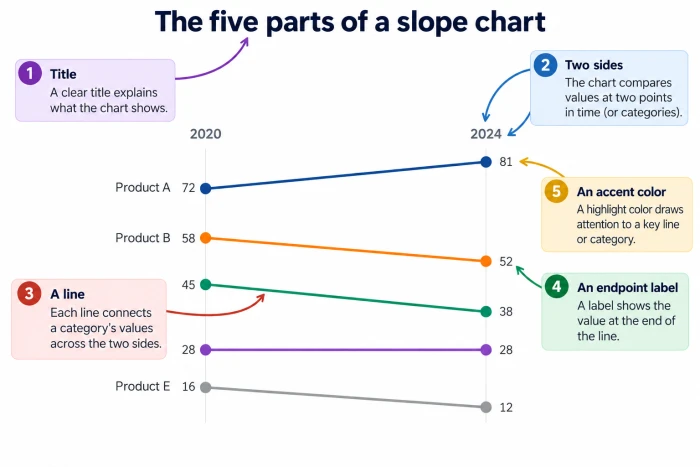
| Part | What it does | Rule of thumb |
|---|---|---|
| Two sides | Left is "before," right is "after." No visible axis needed | Label the top of each side with the period or condition (2021, 2026) |
| Lines | One per item. The slope encodes the size of the change | Same thickness for all lines unless you are highlighting one |
| Endpoint labels | Item name plus value at both ends | Print the value on both sides so nobody has to estimate |
| Color | Separates gainers, losers and the one line you want seen | Gray for context, one accent for the story, a second for declines |
| Title | States the finding, not the topic | "TikTok gained 16 points; X was the only platform to shrink" beats "Social media use, 2021 vs 2026" |
Notice what is missing: gridlines, a legend, a y-axis with tick marks. Every value is printed next to its point, so none of them earn their space.
Where it came from
The chart was introduced by Edward Tufte, the Yale statistician who coined "chartjunk" and "data-ink ratio," in his 1983 book The Visual Display of Quantitative Information. His original compared government tax receipts across countries in 1970 and 1979. He called it a "table-graphic" at the time and renamed it a slopegraph decades later. That first example already did five jobs in one small picture: it showed each country's rank in both years, the exact value next to each name, how much each one changed, how those changes compared, and which countries broke the pattern. Nothing about the design has needed updating since.
Slope chart vs bar chart: the three-second test
Take one real dataset: the share of U.S. adults using each social platform in 2021 versus 2026, from Pew Research Center. Ten platforms, two years, twenty numbers. Here is what each format asks of the reader.
| Format | What the reader has to do | Time to spot the biggest mover |
|---|---|---|
| Table (10 rows, 2 columns) | Subtract 10 pairs of numbers in their head, then rank the results | 20 to 40 seconds |
| Clustered bar chart (20 bars) | Compare the height of each pair, remember the gaps, then rank them | 10 to 20 seconds |
| Slope chart (10 lines) | Find the steepest line | Under 3 seconds |
Treat the timings as rough estimates rather than lab results. The mechanism is what matters: the slope chart does the subtraction for the reader. The steepness of the line is the difference.
Three more reasons it wins:
• Direction is instant. Up is a gain, down is a loss. In this dataset the only downward line is X (formerly Twitter), 23% to 18%. In a bar chart you would read 20 labels to find that.
• Rank is built in. The order of labels on the left is the 2021 ranking, the order on the right is the 2026 ranking, and crossing lines are items that swapped places. That is often the real finding, and a bar chart hides it entirely.
• Long labels fit. Names sit next to the lines, so "Share of adults using WhatsApp" does not get rotated or truncated.
Tufte would call this a high data-ink ratio. Nearly every pixel in a slope chart is data. A bar chart spends most of its ink on the body of bars whose only job is to hold up one point at the top.
Two slope charts built on real numbers
Both examples come with their data so you can rebuild them in your own tool. Values are whole numbers as published.
Example 1: Which social platforms grew, and which one shrank (2021 vs 2026)
Source: Pew Research Center, Americans' Use of Social Media in 2026. Figures are the share of U.S. adults who say they ever use each platform.
| Platform | 2021 (%) | 2026 (%) | Change (pts) |
|---|---|---|---|
| YouTube | 81 | 84 | +3 |
| 69 | 70 | +1 | |
| 40 | 51 | +11 | |
| 28 | 31 | +3 | |
| Snapchat | 25 | 26 | +1 |
| 23 | 33 | +10 | |
| X (formerly Twitter) | 23 | 18 | -5 |
| TikTok | 21 | 37 | +16 |
| 18 | 25 | +7 | |
| Nextdoor | 13 | 18 | +5 |
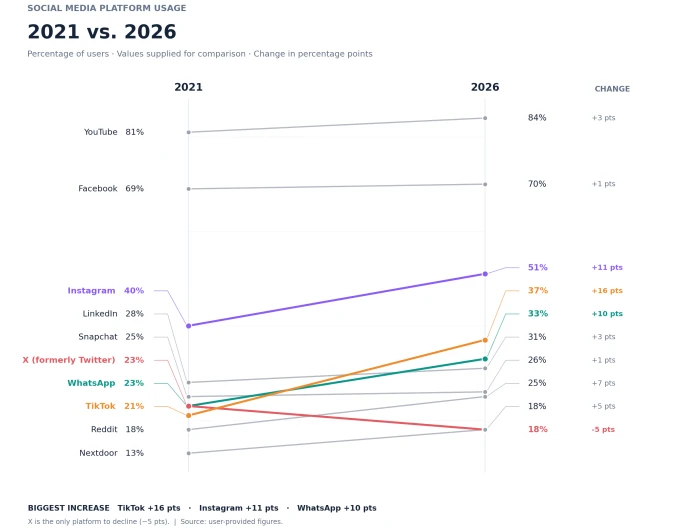
What the chart makes obvious at a glance:
• TikTok has the steepest line, climbing from 8th place to 4th
• X is the only downward line, dropping from a tie with WhatsApp to the bottom of the pack
• YouTube and Facebook are nearly flat, which is a maturity story a bar chart would not emphasize
• TikTok and WhatsApp both cross LinkedIn and Snapchat, so the middle of the ranking reshuffled while the top three stayed put
One footnote belongs on the chart: Pew moved from phone surveys in 2021 to web, mail and phone from 2023 onward, so part of the shift may reflect the method change.
Example 2: Electric car adoption by country (2020 vs 2025)
Source: Pew Research Center analysis of IEA Global EV Outlook 2026 data. Figures are the share of new car sales that were electric or plug-in hybrid.
| Market | 2020 (%) | 2025 (%) | Change (pts) |
|---|---|---|---|
| Norway | 75 | 97 | +22 |
| Iceland | 52 | 62 | +10 |
| Denmark | 16 | 71 | +55 |
| China | 6 | 53 | +47 |
| World | 4 | 25 | +21 |
| United States | 2 | 10 | +8 |
No chart needed here to see the point, which is itself the point. Read the table as a slope chart in your head: Denmark starts at 16 and finishes above Iceland, which started at 52, so their lines cross. China starts near the bottom and ends at more than double the world average. The U.S. line is nearly flat and sits below the world average at both ends. Norway is highest but least interesting, because it was already near the ceiling.
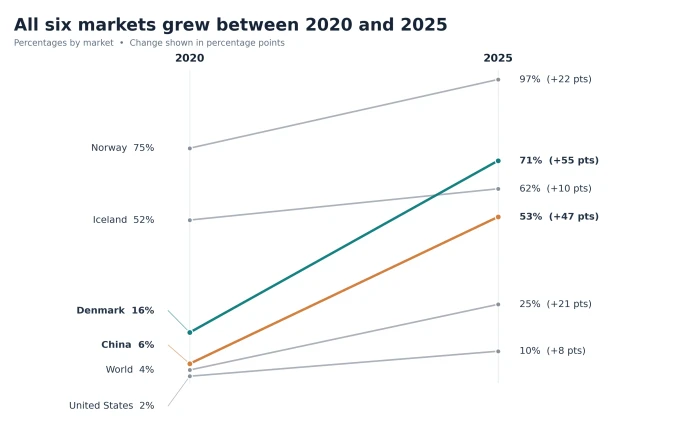
The blind spot. Iceland's share peaked at 71% in 2023, fell to 43% in 2024 when car sales collapsed, then recovered to 62%. A slope chart with two endpoints cannot show that dip. If the path matters, draw a line chart instead. The rulebook below covers when that trade-off is worth making.
How to make a slope chart in Excel, Google Sheets, Power BI and Python
No tool has a "slope chart" button in its default gallery, and none of them needs one. A slope chart is a line chart with two x-values and the furniture stripped off. Start with your data in this shape:
| Item | Before | After |
|---|---|---|
| TikTok | 21 | 37 |
| 40 | 51 | |
| X | 23 | 18 |
Excel (about 4 minutes)
1. Select the three columns, including the header row
2. Insert > Charts > Line with Markers
3. If Excel put "Before" and "After" in the legend instead of on the x-axis, click Chart Design > Switch Row/Column. You want one line per item, two points per line
4. Delete the gridlines, the vertical axis, the chart title and the legend
5. Click the left-hand data points, add data labels, and set the label to show Series Name and Value, positioned Left
6. Click the right-hand points, add data labels showing Value only, positioned Right
7. Set every line to mid-gray, then recolor the one or two lines that carry your story
8. Narrow the chart so the two sides sit close together. The chart should be taller than it is wide
Google Sheets (same idea, 3 minutes)
1. Select the data and choose Insert > Chart
2. Change the chart type to Line chart and tick "Switch rows / columns" if each item is not its own line
3. Under Customize > Gridlines and ticks, set major gridline count to 0
4. Under Customize > Series, turn on data labels and set line colors
5. Hide the vertical axis under Customize > Vertical axis by setting the text color to match the background
Power BI
Two routes. The native one is the standard line chart: unpivot your Before and After columns into a single "Period" column and a "Value" column, put Period on the x-axis, Value on the y-axis and Item on the legend. Microsoft's own Power BI community blog on creating slopegraphs walks through the unpivot step in Power Query. The faster route is the certified Slope Chart visual on Microsoft AppSource, which handles the labels for you.
Python (matplotlib, 20 lines)
import matplotlib.pyplot as plt
data = {"TikTok": (21, 37), "Instagram": (40, 51), "WhatsApp": (23, 33),
"Reddit": (18, 25), "X": (23, 18)}
fig, ax = plt.subplots(figsize=(4, 6))
for name, (before, after) in data.items():
color = "#d1495b" if after < before else "#999999"
if name == "TikTok":
color = "#2a6f97"
ax.plot([0, 1], [before, after], color=color, marker="o")
ax.text(-0.05, before, f"{name} {before}%", ha="right", va="center")
ax.text(1.05, after, f"{after}%", ha="left", va="center")
ax.set_xticks([0, 1], ["2021", "2026"])
ax.set_xlim(-0.6, 1.4)
for side in ["top", "right", "left"]:
ax.spines[side].set_visible(False)
ax.set_yticks([])
plt.title("TikTok up 16 pts, X down 5", loc="left")
plt.tight_layout()
plt.show()
If you want Tufte-style defaults out of the box, the open-source tufteplotlib library on GitHub ships a ready-made slopegraph function built on matplotlib.
Tableau, Looker Studio and everything else
Same recipe: two columns on the x-axis, one line per item, labels on both ends, gridlines off. If your tool lets you filter a longer time series down to just the first and last period, you can turn any existing line chart into a slope chart in one click.
Prefer a no-code route? These four will draw a slope chart from a pasted table in a couple of minutes:
• Datawrapper: paste your two columns, pick a line chart, direct-label both ends
• Flourish: same idea, with animation if you want the lines to draw on
• RAWGraphs: open source, exports clean SVG you can edit afterwards
• chartgpt.co: describe the before and after in plain English and it generates the chart for you
The slope chart rulebook: when to use it, when to skip it, how to make it clean
Use a slope chart when all four are true
1. You have exactly two values per item (two dates, before and after, test and control)
2. Every item shares one scale and one unit
3. You have roughly 3 to 15 items
4. The question is "what changed?" rather than "what happened along the way?"
That covers pricing changes, redesigns, campaign flights, year-over-year comparisons, two-group comparisons on the same measure, and rank changes in league tables or market share.
Pick something else when
| Situation | Better choice | Why |
|---|---|---|
| Three or more time points and the path matters | Line chart | A slope chart hides everything between the endpoints, like Iceland's 2024 dip |
| More than 15 to 20 items | Dumbbell chart or a sorted bar chart of the differences | Too many lines become spaghetti and labels collide |
| Values span several orders of magnitude | Log scale or a table | A line from 2 to 10 looks flat next to a line from 16 to 71, even though it is a 5x gain |
| Items do not share a unit | Indexed slope chart (percent change) or separate charts | A line from $2M to $3M and a line from 40% to 45% cannot share an axis |
| You need exact levels, not change | Bar chart | Bars show "A is bigger than B" better when the change is not the point |
The simple test: if you are about to add a legend, a third column, or a note explaining what happened in the middle, you have outgrown the slope chart.
Seven design rules
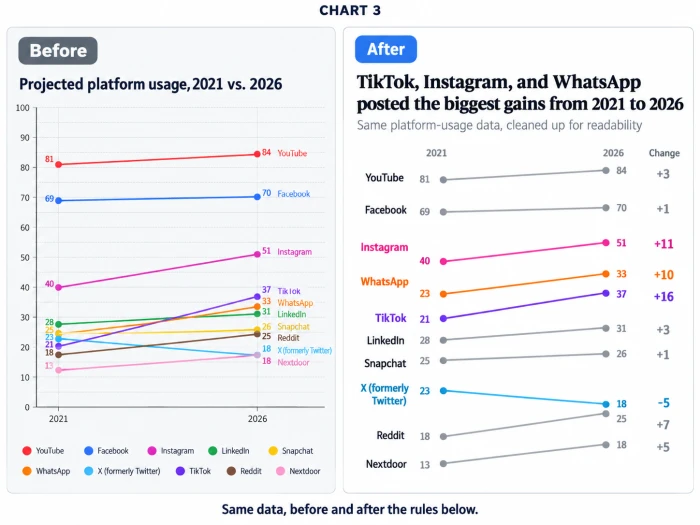
1. Gray everything, then color the story. One neutral gray for every line, one accent color for the lines that matter, a second color for declines if relevant. More than three colors and the chart stops having a point.
2. Label both ends with the value. Name and value on the left, value on the right (and the name again if lines cross a lot). Never make readers trace a line back to find out what it is.
3. Kill the y-axis and the gridlines. Once every point carries its value, both are redundant.
4. Put the finding in the title. "Paid social activation rose 9 points after the redesign" tells the reader what to look for. "Activation rate by channel" makes them do the work.
5. Fix label collisions by hand. When two items end at 18%, nudge one label up and one down, or merge them ("X, Nextdoor 18%"). Tools rarely get this right on their own.
6. Keep it tall. A chart wider than it is tall flattens every slope. Aim for roughly 1.5 times taller than wide.
7. Cap it at 15 lines, and sort before you cut. With 40 items, show the top 10 by absolute change and say so in a footnote. Better still, show the 10 that matter to the decision in the room.
Two mistakes that quietly ruin otherwise good charts: starting the invisible scale above zero without saying so, which exaggerates every slope, and connecting unrelated categories on the left and right so the slope has no meaning.
The one chart to reach for when someone asks "so what changed?"
A slope chart does three things no other chart does as cleanly: it shows direction, size of change and rank change in a single glance, with no legend and no axis. It takes minutes to build in any tool you already use. And it forces you to answer the question people actually ask about before and after data, instead of handing them a bar chart and hoping they find the story.
The next time you have two columns of numbers and a stakeholder who wants the answer fast:
1. Put "before" on the left and "after" on the right
2. Draw one line per item
3. Gray everything, then color the one line that matters
4. Write the finding in the title
That is the whole method.
Try it this week: take the last before and after comparison you presented as a bar chart, rebuild it as a slope chart using the Excel or Python steps above, and put the two side by side. If the slope chart does not get the point across faster, we would like to hear about it in the comments.