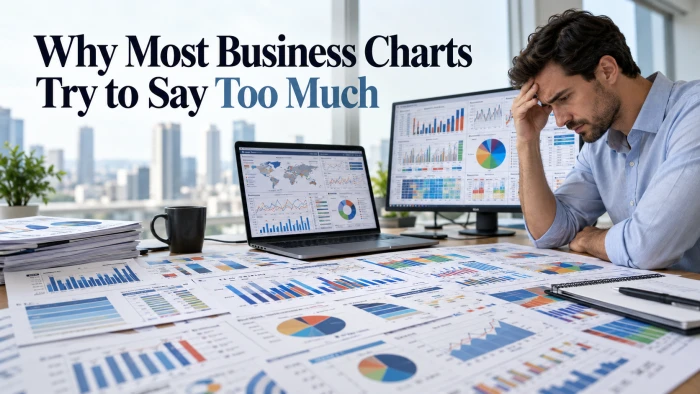
Be honest. When was the last time your boss or client read your monthly social media report all the way to the end?
If you had to think about it, you already know the answer. Most reports get a 10 second scroll, a polite "looks good," and a one way trip to an inbox folder that never gets opened again. Hours of exporting, formatting, and screenshotting, wasted.
Here is the part most marketers get wrong: the problem is not your data. It is your charts. Most reports dump every number the platform offers, from impressions to profile taps to story exits, with zero story tying them together. Readers drown, then they bail.
The fix is almost unfairly simple: show fewer charts, and make every single one answer a question a decision maker actually loses sleep over. One global brand used this exact approach to lift engagement per post by 82%. We break down how below.
Here is what you are about to get:
• The 9 charts worth choosing from for your monthly report, plus the exact chart type for each one (number 8 is the one finance teams actually look at)
• A real brand case study with hard numbers, not vague "success stories"
• The 6 vanity charts quietly killing your credibility (delete them today)
• A copy-ready report template and pre-send checklist you can use this month
Ready to build a report people actually look forward to opening? Let's go.
The One Rule That Separates Reports That Get Read From Reports That Get Deleted
Before any chart earns a spot in your report, ask yourself one thing: what decision will this help someone make? If you cannot answer in a single sentence, cut the chart.
The easiest way to organize your charts is by the three layers of the social media funnel. Each layer answers a different question for the people reading your report.
| Report layer | The question it answers | Example metrics |
|---|---|---|
| Awareness | Are more of the right people seeing us? | Reach, impressions, follower growth |
| Engagement | Do people care about what we post? | Engagement rate, shares, saves, comments |
| Conversion | Is social driving real business results? | Link clicks, website sessions, leads, sales |
Lead with the layer your reader cares about most. A CMO or business owner usually wants Conversion first. A community or content team often wants Engagement first.
Pro tip: Write a one sentence takeaway above every chart, phrased like a headline. "Reach grew 18% after we doubled our Reels" beats a plain "Monthly Reach" label every single time.
The 9 Charts That Turn a Boring Report Into a Must-Read (Save This List)
These nine charts cover the full journey from first impression to sale. Few businesses need all of them every month. Use the funnel layers above to pick the five or six that match your goals, and add the rest only when the data behind them is solid.
1. The Executive KPI Scorecard (The Only Page Your CEO Will Read)
This is the first thing anyone sees, so it must work on its own. Show 4 to 6 big numbers for your most important KPIs, each with its month over month change and its target.
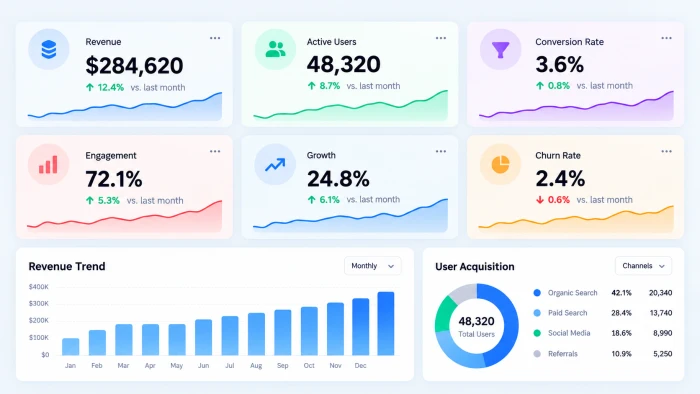
• Best chart type: KPI tiles (big number cards) with a green or red arrow and a tiny trend line
• What to include: The 4 to 6 metrics tied to your goals, such as total reach, engagement rate, net new followers, link clicks, and leads or sales from social
• Answers: "Are we on track this month?"
• Example headline: “Social leads hit 38 this month, 95% of our target of 40.”
2. Audience Growth Over Time (Stop Bragging About Total Followers)
Total followers is a vanity number. Net new followers and follower growth rate tell you whether your audience is actually expanding.
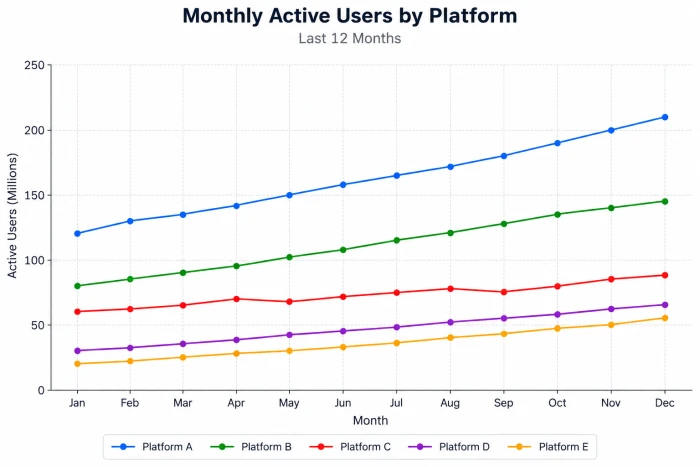
• Best chart type: Line chart with one line per platform, covering the last 6 to 12 months
• Where to find the data: The audience or followers tab in each platform's built-in analytics, such as Meta Business Suite, LinkedIn Page analytics, or YouTube Studio
• Answers: "Is our audience growing faster or slower than before?"
• Example headline: "Instagram grew 4.2% this month, our fastest growth since March."
• Pro tip: Use growth rate (new followers divided by starting followers) so a small account and a big account can be compared fairly. For example, 420 new followers on a 10,000 follower account is a 4.2% growth rate.
3. Reach and Impressions Trend (Find the Spike, Find the Lesson)
Reach is how many unique people saw your content. Impressions is how many times it was seen in total. Together, they show how visible you are.
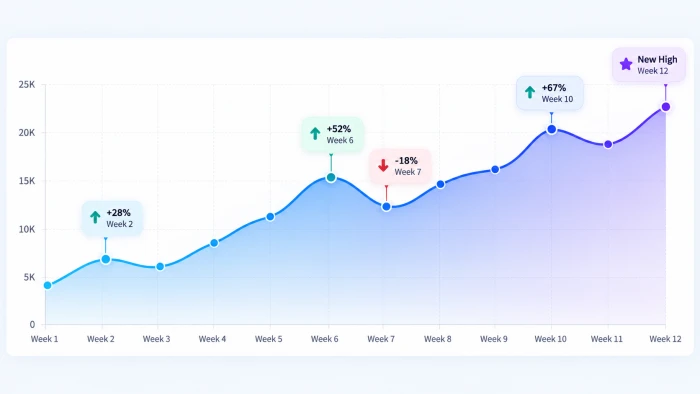
• Best chart type: Line or area chart by week, with short callout labels on the spikes
• Where to find the data: Your platform analytics, exported by week so you can see the shape of the month, not just the total
• Answers: "What made our visibility jump or drop this month?"
• Example headline: "Reach rose 31% in week three, driven by one product demo Reel."
• Read it like a pro: If impressions climb much faster than reach, the same people are seeing you again and again. That is fine for reminders, but it can also mean you need fresh audiences.
4. Engagement Rate by Platform (The Fairest Fight on Social)
Raw likes always favor big accounts. Engagement rate (total engagements divided by reach) shows where your audience truly cares.
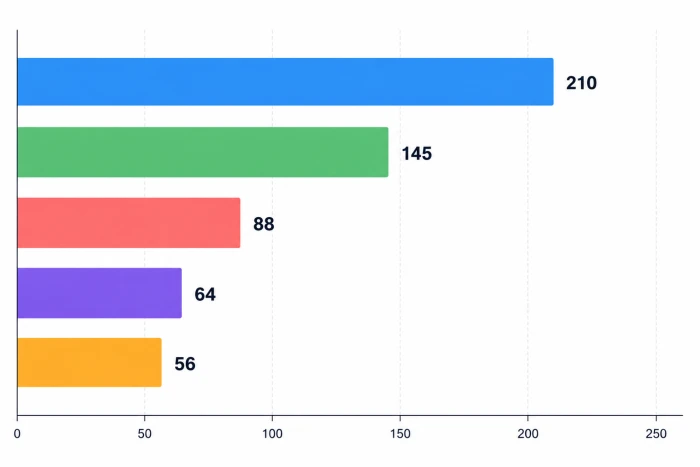
• Best chart type: Horizontal bar chart, sorted from highest to lowest
• The formula: (Total engagements ÷ reach) × 100. For example, 900 engagements ÷ 20,000 reach × 100 = a 4.5% engagement rate.
• Answers: "Which platform deserves more of our time and budget?"
• Example headline: "LinkedIn earned a 4.5% engagement rate, nearly double our Facebook rate."
• Pro tip: Pick one engagement rate formula and stick with it every month. Switching formulas makes your trends meaningless.
5. Content Format Showdown (Reels vs Carousels vs Everything Else)
Compare how each format performs: short videos, carousels, single images, text posts, Stories, and live streams.
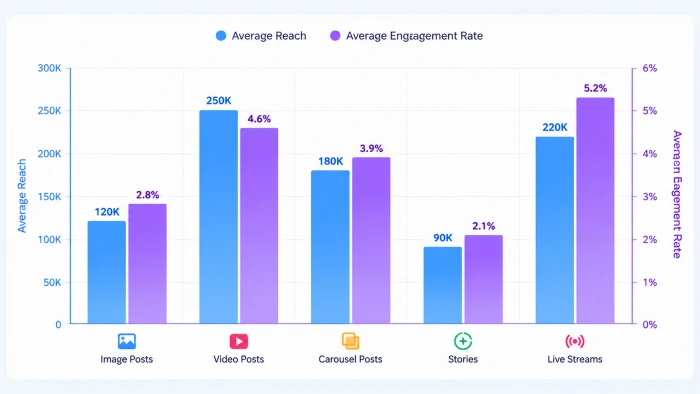
• Best chart type: Grouped bar chart showing average reach and average engagement rate per format
• Where to find the data: Export post-level data from each platform, then add a "format" column in a spreadsheet and tag every post
• Answers: "What kind of content should we make more of next month?"
• Example headline: “Carousels earned twice the saves of single images across 14 posts.”
6. Top 5 Posts Leaderboard (Your Whole Strategy Is Hiding Here)
People remember content, not numbers. A visual leaderboard of your best posts makes your results instantly relatable.
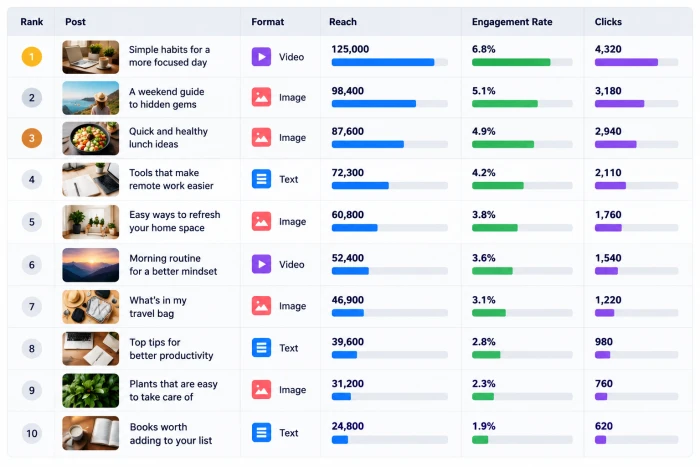
• Best chart type: Ranked table with post thumbnails, format, reach, engagement rate, and clicks
• What to include: Thumbnail, publish date, format, reach, engagement rate, clicks, and one short line on why it worked
• Answers: "What exactly worked, and why?"
• Example headline: “Our top three posts all opened with a question in the first line.”
• Bonus idea: Add your two weakest posts as well. Knowing what flopped saves as much time as knowing what worked.
7. Best Time to Post Heatmap (Stop Guessing, Start Scheduling)
A heatmap shows at a glance when your audience is most active and most responsive.
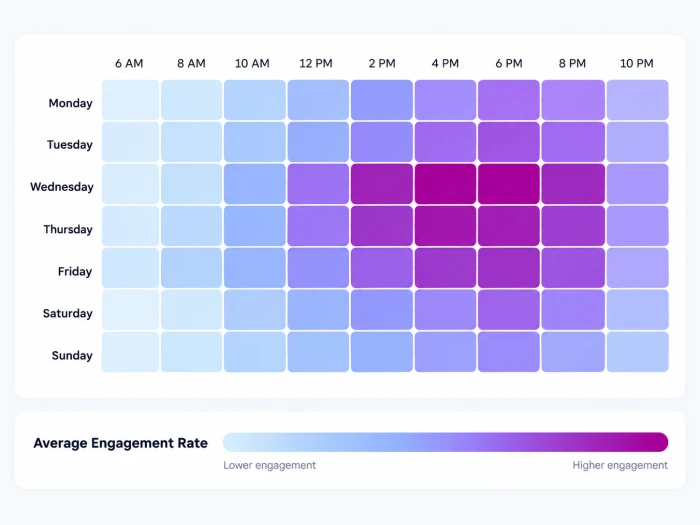
• Best chart type: Heatmap grid with days of the week down the side, hours across the top, and color showing average engagement rate
• Where to find the data: Post-level exports that include publish date and time, averaged by day and hour with a simple spreadsheet pivot table
• Answers: "When should we schedule our most important posts?"
• Example headline: “Tuesday and Thursday mornings earned 40% more engagement than weekend posts.”
Skip this if you post fewer than about 40 times a month. With less data the grid shows noise, not a pattern.
8. Social to Sales Funnel (The Chart That Gets Budgets Approved)
It follows people from a social post to a click, a website visit, and finally a lead or a sale.
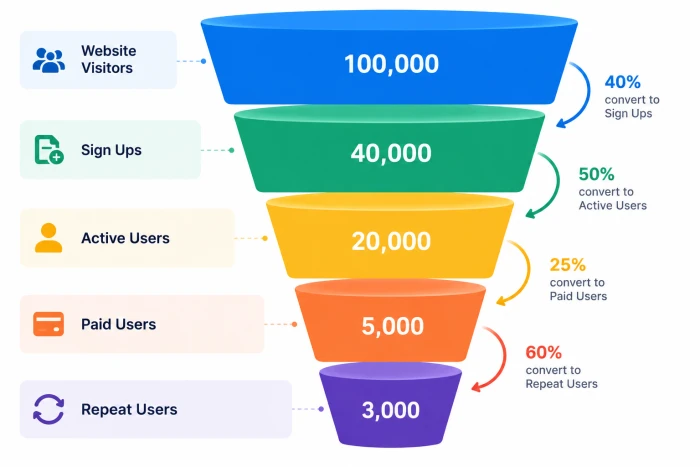
• Best chart type: Funnel chart, with the conversion rate shown between each stage
• Stages to show: Impressions, link clicks, website sessions, and leads or purchases
• Where to find the data: Link clicks come from your platform analytics. Sessions and conversions come from your website analytics tool.
• Answers: "Is social media actually making us money?"
• Example headline: "Social drove 1,240 website visits and 38 leads, a 3.1% visit to lead rate."
• Pro tip: Tag every link in your bio, posts, and ads with UTM parameters so your analytics tool can credit social correctly. Google walks through the exact setup in its official guide to collecting campaign data with custom URLs.
Skip this if social isn't meant to drive site traffic, for example a brand-awareness or community account. Report engagement depth (saves, shares, comments per post) instead.
9. Sentiment Breakdown (How People Really Feel About Your Brand)
Engagement numbers tell you how much people reacted. Sentiment tells you how they felt about it.
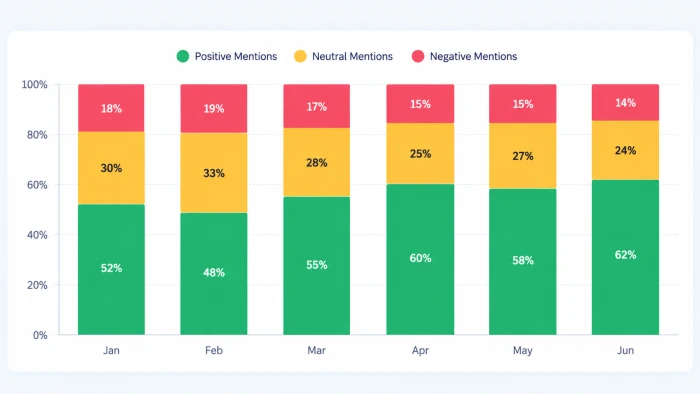
• Best chart type: 100% stacked bar chart showing positive, neutral, and negative mentions for each of the last 3 to 6 months
• Where to find the data: A social listening tool, or for smaller accounts, a simple spreadsheet where you tag each comment and mention as positive, neutral, or negative
• Answers: "Is our brand reputation getting better or worse?"
• Example headline: “Negative mentions fell from 12% to 7% after we fixed the shipping delay.”
Skip this if you get fewer than a few dozen mentions a month. A swing from 3 negative to 2 isn't a trend.
Bonus: Audience demographics like age, gender, and location rarely change from one month to the next. Move them to a quarterly report and keep your monthly report lean.
Real Case Study: How Trek Bicycle Turned One Metric Into an 82% Engagement Jump
Want a real example of focused reporting? Look at Trek Bicycle, one of the biggest bike makers on the planet.
The challenge
Trek sells in more than 90 countries and runs several brands, including Trek, Electra, Bontrager, and Diamant. Its social audiences were huge: over 900K fans on Facebook, 400K on Instagram, 200K on Twitter, and 74K on YouTube.
But size created a problem. Every brand, network, and region measured success in its own way. Nobody could fairly compare a post in Spain with a post in Australia, so nobody knew which content truly worked.
What Trek changed in its reporting
1. One metric to rule them all. Trek chose engagement per post as its standard metric. Because it's an average, teams that post more often no longer win by default. (This is the thinking behind Chart 4 above, with one caveat covered below.)
2. Tracked it over time by post type. Watching that one metric month after month showed which types of posts earned the best response. (Hello, Chart 5.)
3. Shared the scoreboard globally. Trek reported every region's performance to teams around the world. This sparked friendly competition and helped each team copy what was winning elsewhere. (That is Chart 6 in action.)
| A caveat on "engagement per post" |
|---|
| Engagement per post fixes one unfairness: it stops teams that post 40 times a month from automatically beating teams that post 10. It does not fix the other one. A 500,000-follower account will usually earn more engagements per post than a 5,000-follower account simply because more people see it, however good or bad the content is. Here is an illustrative example (not Trek's data): |
|---|
| Account | Followers | Posts this month | Total engagements | Engagement per post | Per post as % of followers |
|---|---|---|---|---|---|
| Global account | 500,000 | 40 | 6,000 | 150 | 0.03% |
| Regional account | 5,000 | 10 | 2,000 | 200 | 4.0% |
| Per post, the regional team wins narrowly. Per follower, it wins by a landslide, and that is the real story. Engagement per post works well for comparing post types or time periods within one account, which is mostly how Trek used it. To compare accounts of different sizes, use engagement rate: engagements divided by reach or by followers (Chart 4). Pick one denominator and keep it. |
|---|
The results
• 82% increase in engagement per post
• 61% increase in total engagement
What you can steal from Trek
Trek did not add more charts. It picked one fair metric, tracked it consistently, and made results visible to everyone who creates content. You can do the same this month, even with a team of one.
Source: Trek Bicycle Uses Simply Measured to Increase Engagement, a case study published by Simply Measured (acquired by Sprout Social in 2017). The PDF does not state the measurement period or baseline, so treat the 82% as a vendor-reported figure rather than an audited one.
6 Chart Mistakes That Make Your Boss Stop Reading
Adding the right charts is only half the job. Deleting the wrong ones matters just as much. Here are the most common report killers and what to use instead.
| The mistake | Why it hurts | Do this instead |
|---|---|---|
| Pie chart with 8 or more slices | Nobody can compare thin slices by eye | Sorted horizontal bar chart |
| Total followers as the headline number | Big totals hide slow or stalled growth | Net new followers and growth rate |
| A number with no comparison | "12,400 impressions" means nothing on its own | Show last month, last year, or the target beside it |
| Screenshots pasted from native dashboards | Mixed styles, tiny text, and no story | Rebuild the key numbers in one clean, consistent template |
| 3D effects and rainbow colors | They distort values and distract the eye | One brand color plus one highlight color for the key point |
| Charts with no "so what" | Readers have to guess what matters | A one line takeaway and a next step under every chart |
Quick test: Hand your report to someone outside the marketing team. If they cannot explain what happened this month in 60 seconds, simplify it.
Steal This: The Copy-Ready Monthly Report Template That Reads in 5 Minutes
This page order follows the funnel from awareness to results and ends with a clear plan, so every report reads like a story. Download the template with sample data (see the appendix at the end of this draft for the file contents; the link goes live once the file is hosted).
1. The month in one sentence + KPI Scorecard (Chart 1). Example headline: "Social drove 1,240 website visits and 38 leads in September, up 22% from August."
2. Awareness: Audience Growth (Chart 2) and Reach and Impressions Trend (Chart 3)
3. Engagement: Engagement Rate by Platform (Chart 4) and Content Format Showdown (Chart 5)
4. Content wins: Top 5 Posts Leaderboard (Chart 6) and Best Time to Post Heatmap (Chart 7)
5. Business results: Social to Sales Funnel (Chart 8)
6. Reputation: Sentiment Breakdown (Chart 9)
7. Next month's game plan: three specific actions, each backed by a chart in the report
Writing for a CEO, founder, or client? Move the Social to Sales Funnel up to page two, right after the scorecard. Busy decision makers want results first.
Pre-send checklist
Run through this list before you hit send:
• Every chart has a one line headline takeaway
• Every number sits beside a comparison (last month, last year, or target)
• Your engagement rate formula matches last month's
• Every link in posts and bios is tagged with UTM parameters
• Every spike and drop is labeled with the reason
• The whole report can be read in five minutes or less
• The final page lists three clear actions for next month
The Bottom Line: Fewer Charts, Bigger Wins
A great monthly social media report is not the one with the most charts. It is the one that answers the right questions fast.
Your next step: Open last month's report today. Delete one vanity chart, add one takeaway headline, and tag every link with UTM parameters. Small changes, big difference.
Bookmark this guide before your next report is due. Then send it to whoever builds the reports on your team. They will thank you on the first of the month.