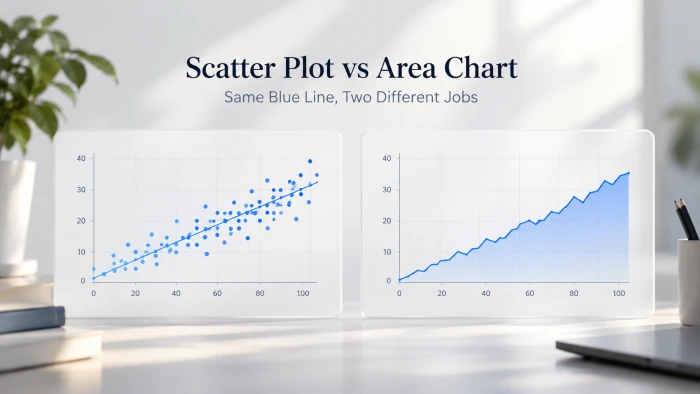
We pasted two small datasets into a scatter plot maker and an area chart maker, kept every default, and compared what came out. Here's what each chart did with the numbers, what caught our eye, and four differences that should decide which one you reach for.
Scatter plot Two measures, one point per row. The question it answers: when one goes up, what does the other do? | Area chart One measure over an ordered sequence, with the space under the line filled. The question: how much, and how did it change? |
Scatter plots and area charts get confused for each other more often than you'd think, mostly because both can end up looking like "a blue line with dots on it." That's exactly what happened in our test. The two outputs below share the same line, the same hollow markers and the same light gridlines. The only visible difference is a fill, and that fill changes what the chart is claiming.
Rather than argue from theory, we ran both chart makers on real numbers and kept every default the tool chose: title, axis range, labels, formatting. Everything you see is what the tools produced on the first try.
The test setup
Two datasets, two chart makers, zero manual styling. The scatter dataset pairs a measured input (hours studied) with a measured outcome (test score). The area dataset tracks one metric (website visits) across six consecutive months.
Dataset A Pasted into the scatter plot maker
| Dataset B Pasted into the area chart maker
|
Both were pasted as plain markdown tables, then generated with a single click. Notice that Dataset A's x-values are numbers you could measure in fractions (2.5 hours is meaningful), while Dataset B's x-values are labels in a fixed order. That distinction turns out to matter more than anything else in this post.
Test 1: the scatter plot maker
The page describes its job as looking for a relationship between two measures. We pasted the seven study-hour rows and hit Generate.
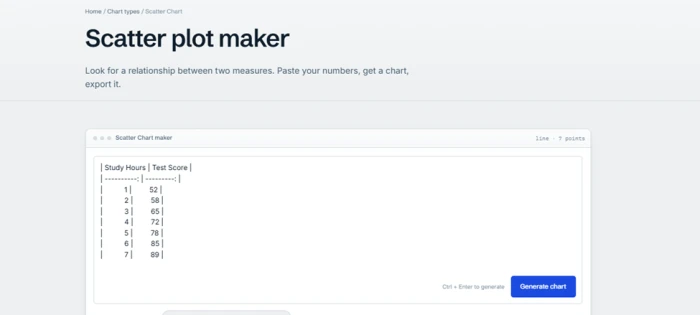
Fig. 1 The scatter maker's editor with Dataset A pasted in. Note the detection readout in the top-right corner: "line · 7 points".
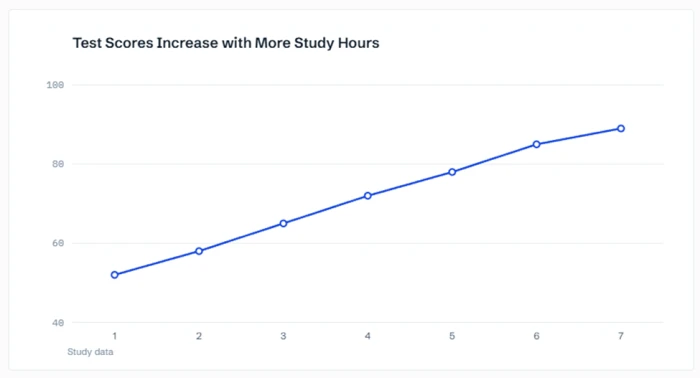
Fig. 2 The generated result. Seven markers, joined by straight segments, on a y-axis that starts at 40.
What came out: a chart titled "Test Scores Increase with More Study Hours", a y-axis running 40 to 100, an x-axis from 1 to 7 labelled "Study data", and seven hollow-circle markers connected by a blue line. It reads as a clean, rising trend, and the slight flattening between hours 6 and 7 is visible if you look for it.
Test 2: the area chart maker
The area maker's description is more specific about what it promises: a line chart with the volume filled in, on a zero baseline, so the size of the shape means what it says. We pasted the six months of visits.
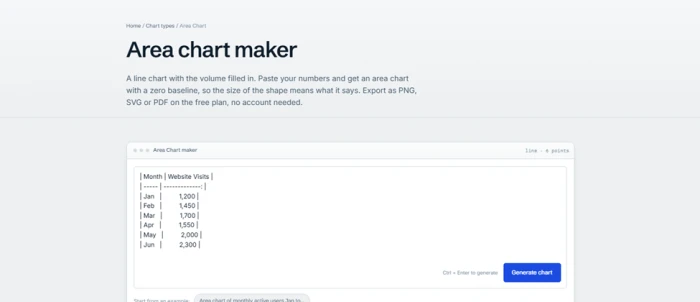
Fig. 3 The area maker's editor with Dataset B. Same detection readout style: "line · 6 points".
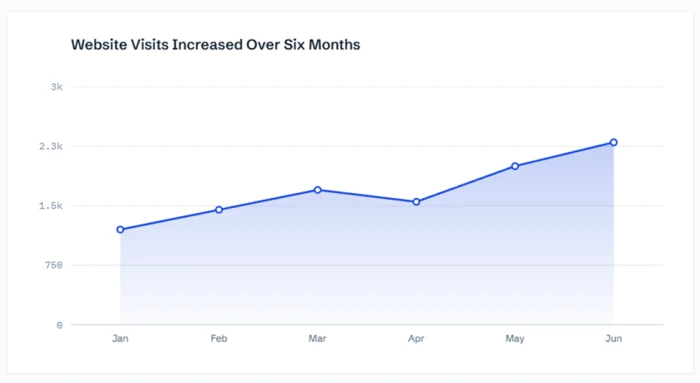
Fig. 4 The generated area chart. Same line, same markers, but the space beneath is filled down to a zero baseline and the April dip becomes a notch in the shape.
What came out: a chart titled "Website Visits Increased Over Six Months", a y-axis pinned at 0 and topping out at 3k, month labels along the x-axis, and a gradient fill under the line that fades toward the baseline. The April dip is unmistakable.
Things to notice
Small details in the two outputs tell you a lot about how each chart type thinks. Some of these are worth fixing before you publish a chart of your own.
○ Both editors said "line"
The detection readout reported "line · 7 points" and "line · 6 points". Both parsers classified the paste as a single series, and the scatter maker joined the dots. What we got from Test 1 is technically a connected scatter (a line with markers), not a cloud of independent points. With one y per x and the x-values already sorted, that's a reasonable default, but it quietly implies a continuous path between hour 3 and hour 4 that the data never measured.
○ The y-axis floor is the biggest difference in the whole test
The scatter maker fit its axis to the data and started at 40. The area maker started at 0, as its description promised. The effect on perception is large: scores rose 71% (52 to 89), and on a 40 to 100 axis that line climbs about 62% of the plot height. Visits rose 92% (1,200 to 2,300), yet on a 0 to 3k axis the shape climbs only about 37% of the plot height. The dataset that grew more looks like it grew less.
○ The titles are claims, not descriptions
"Test Scores Increase with More Study Hours" and "Website Visits Increased Over Six Months" were written for us in headline style. That's convenient for a blog, but the first one asserts a causal-sounding relationship from seven data points. Treat auto-generated titles as a first draft.
○ Check the axis labels
The scatter x-axis reads "Study data" rather than "Study Hours" from the pasted header, and the y-axis has no label at all. The area chart has no axis labels either; it relies on the month names and the title. Both charts are still readable, but only because the titles carry the meaning.
○ Rounded tick labels can mislead by a hair
The area maker chose four equal steps of 750: 0, 750, 1,500, 2,250, 3,000, then shortened them to 750, 1.5k, 2.3k and 3k. That "2.3k" gridline actually sits at 2,250, which is why the June marker (2,300) floats just above it. Compact labels are nice; just know they're rounded.
○ The fill turns a dip into a loss
April's 1,550 is a lower point on a line, but a visible notch cut out of a filled shape. The area chart makes a decline feel like volume that went missing. Dataset A was monotonic, so the scatter had nothing comparable to show, but had it dipped, the drop would have read as one lower dot rather than a bite out of a shape.
○ Headroom differs too
The scatter axis stops at 100, the natural ceiling for a score. The area axis runs to 3,000 even though the data peaks at 2,300, leaving roughly 30% of empty space above the shape. Neither is wrong, but it's one more reason not to compare slopes across charts by eye.
Four differences that actually matter
Strip away the styling and the two charts differ in what they are for, what belongs on their x-axis, where their y-axis is allowed to start, and what your eye ends up reading. Each of these showed up in the test above.
What each chart is for
The two makers' own descriptions say it plainly. The scatter page frames itself around looking for a relationship between two measures. The area page frames itself around volume: a line with the space beneath it filled in.
| Scatter plot | Area chart |
|---|---|
Plots two measurements per row and asks whether they move together. The message is the pattern of the points: tight and rising, loose and flat, curved, clustered, or scattered with outliers. In Test 1, the message is "more hours, higher score, with a slight taper at the top." | Plots one measurement across an ordered sequence and asks how much there was, and how that changed. The message is the size of the shape and the way its top edge moves. In Test 2, the message is "visits nearly doubled, with one soft month in April." |
In practice: if your table has two number columns and you're wondering whether they're related, you want a scatter. If it has a time or category column and one number, you want a line or area chart.
What goes on the x-axis
This is the difference the test setup hinted at. Dataset A's x-values are quantities; Dataset B's are labels in a sequence.
| Scatter plot | Area chart |
|---|---|
| The x-axis is a measured, continuous scale. A point can sit at 2.5 hours or 6.75 hours, and the spacing between points carries meaning. Rows don't need to be sorted, and several rows can share the same x-value. | The x-axis is an ordered set of categories, usually time periods. Jan, Feb and Mar are spaced evenly no matter how many days each holds, and there's exactly one value per period. Put "Jan" on a scatter's x-axis and you've made a line chart with extra steps. |
In practice: if you can't sensibly ask "what happens at 2.5 on the x-axis?", you don't have scatter data.
Where the y-axis is allowed to start
The scatter maker started at 40. The area maker started at 0. Neither made a mistake; they follow different rules.
| Scatter plot | Area chart |
|---|---|
The axis can start wherever the data makes sense, because readers judge position and pattern, not area. Zooming the y-axis to 40 to 100 shows the shape of the relationship more clearly and wastes no space on empty scores below 40. The trade-off: the slope looks steeper than a zero-based chart would show, so add the axis range to your caption if steepness is the point. | The axis has to start at zero, because the fill is a quantity. A filled region from 1,200 up to 2,300 says "this much"; if the baseline were 1,000, February's shape would look a fifth the size of June's despite being nearly two thirds of it. The area maker's own description calls this out, and it's the one rule you should never bend on an area chart. |
In practice: a fill that doesn't reach zero is a red flag. A scatter axis that doesn't reach zero is normal.
What your eye reads
Same line, same dots, but the fill changes what a reader takes away in the first two seconds.
| Scatter plot | Area chart |
|---|---|
Readers look for direction, tightness and exceptions. Each point stands alone, so an outlier is obvious and a cluster is obvious. A connecting line is optional and, as Test 1 showed, adds a hint of continuity you may not want. A trend line is the more honest addition. It scales well: hundreds of points still make sense, and the more you have, the more the pattern speaks. | Readers look at mass. Rises feel like gains, dips feel like losses, and the whole shape suggests accumulation even when the data isn't cumulative. That's why the April notch in Test 2 lands harder than a lone lower dot would. It works best with a single series over a handful of periods. Overlapping fills for several series get muddy fast; stacked areas are the exception, when you want to show how parts add up to a total. |
In practice: use the fill when magnitude is the story. Use bare points when the relationship is the story.
Which one should you use?
A quick check against your own data.
| Your situation | Reach for |
|---|---|
| Two numeric measurements per row, and you want to know if they're related | Scatter plot |
| One value per time period and you want the size of the change to be felt | Area chart |
| You need to spot outliers or clusters | Scatter plot |
| Several series that cross each other over time | Line chart, not area |
| Several series that add up to a total | Stacked area chart |
| Hundreds of data points | Scatter plot |
| A single metric over 5 to 24 periods with a clear trend | Area chart |
Verdict on our two tests
Dataset A: study hours vs test score The auto-generated connected line is fine for a blog illustration, but the more honest chart is a true scatter, unconnected points with a fitted trend line. Before publishing, rename the x-axis from "Study data" to "Study hours", add a y-axis label, and soften the title unless you can back the causal claim. | Dataset B: monthly website visits The area chart is the right call: one series, six periods, zero baseline, and the April dip reads clearly. The only edits worth making are an axis label for visits and, if precision matters, full tick labels instead of the rounded "2.3k". |
The line and the dots were never the point. The scatter plot is a question about two measures; the area chart is a statement about one. Pick the chart that matches the question your data was collected to answer, and the styling mostly takes care of itself.