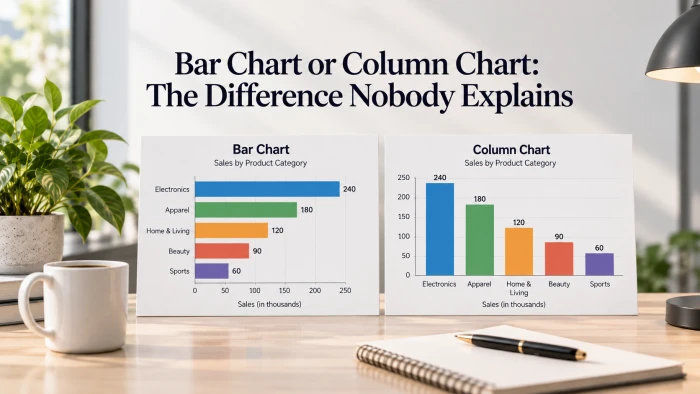
The short version. A column chart stands its bars up, growing vertically from a bottom axis. A bar chart lays them on their side, growing horizontally from a left axis. Most software, Excel included, names them exactly that way. The reason nobody explains it is that most people call both of them bar charts in conversation, and they are rarely corrected. So the word points at two different pictures, and everyone quietly assumes theirs is the obvious one. |
First, what the two charts share
Before the difference, the thing they have in common, because it explains everything else that follows. In both charts a single value is drawn as a bar whose length begins at zero. Twice the value is twice the length. That is the entire reason bars are easy to read: your eye compares lengths directly, with no arithmetic in between.
Every one of these charts has two axes doing two different jobs.
- The value axis carries the numbers. It has to start at zero, because the length of a bar is the value, and a cropped axis quietly lies about how big the gaps are.
- The category axis carries the labels: the quarters, the products, the survey answers. It has no zero and no scale. It simply lists the things being compared.
The only structural difference between a column chart and a bar chart is which axis is which. Stand the bars upright and the categories run along the bottom, the values up the side. Lay the bars flat and the categories run down the side, the values along the bottom. Same data, same lengths, rotated ninety degrees. Every rule below is really just a consequence of that single choice.
Why the names are a mess
Three groups use the words slightly differently, and each is internally consistent, which is why the confusion survives.
- Spreadsheet tools. Excel, Google Sheets and most chart makers reserve column for the vertical version and bar for the horizontal one. If you have ever hunted through a chart menu wondering why your bar chart came out sideways, this is why.
- Everyday speech. Most people say bar chart for anything made of bars, pointing up or lying flat. It is not wrong, it is just imprecise.
- Statistics textbooks. Here bar chart is often the umbrella term, and the two are separated as vertical and horizontal bar charts.
There is a simple way out of the tangle. Say which way the bars point. Ask for vertical bars or horizontal bars and nobody, in any of those three camps, can hand you the wrong picture.
The first time this bit me was a client call where I asked for a bar chart and got the vertical one I did not want in the deck. Now I just say the direction out loud and skip the guessing.
See the difference
Here is the same kind of information shown both ways. Read each one slowly and notice what your eye does, then try generating your own version in the empty slot underneath.
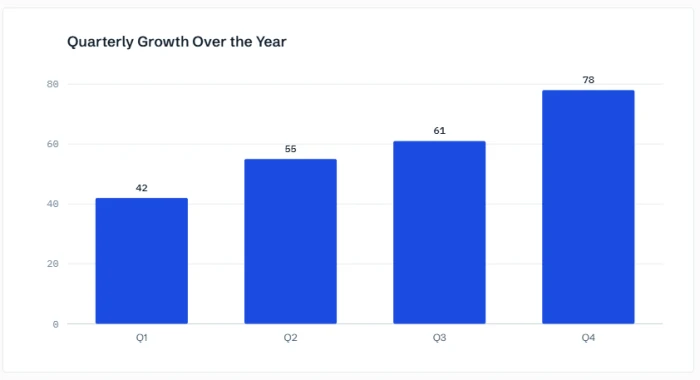
A column chart. Time sits on the bottom axis, so left to right reads as the year unfolding, and the strongest quarter is the one point coloured in.
How to read it. The quarters sit on the bottom, so the four columns march left to right like the year itself. Because each column starts at zero, its height is the revenue, and the jump from Q1 to Q4 is a genuine near-doubling rather than an illusion from a cropped axis. Only the strongest quarter is coloured, which tells you where to look before you have read a single number.
Your ChartGPT column chart goes here Generate it on ChartGPT, export as PNG or SVG, and place it in this space. Prompt to paste: Column chart of quarterly revenue. Q1 42, Q2 55, Q3 61, Q4 78. Title it that Q4 was the strongest quarter and highlight Q4. |
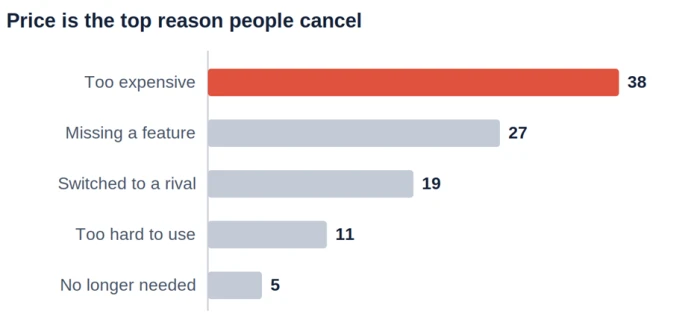
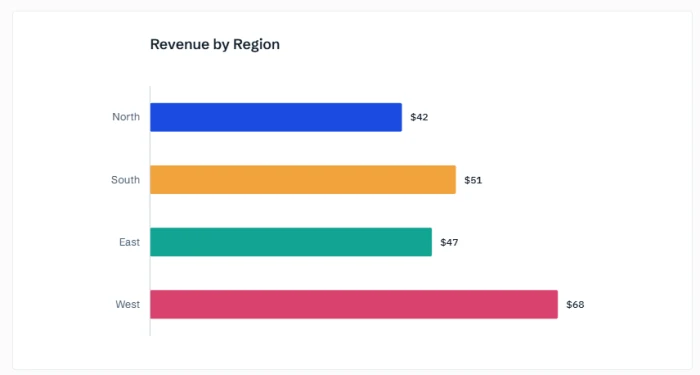
A bar chart. The categories are sorted longest to shortest, the long labels sit flat on the left with nothing rotated, and the top reason carries the only splash of colour.
How to read it. Now the categories sit on the left and the bars grow to the right. They are sorted longest to shortest, so the ranking is simply the shape of the chart, top to bottom. The long labels are spelled out flat with nothing turned sideways, which is the single biggest reason to lay a chart on its side. Again, one colour marks the bar that matters.
The same numbers, rotated
If the anatomy still feels abstract, here is the plainest proof that a column chart and a bar chart are one chart seen from two angles. Both panels below hold the exact same three values. The middle one is highlighted in each, so you can watch it keep its size while the whole thing turns ninety degrees.
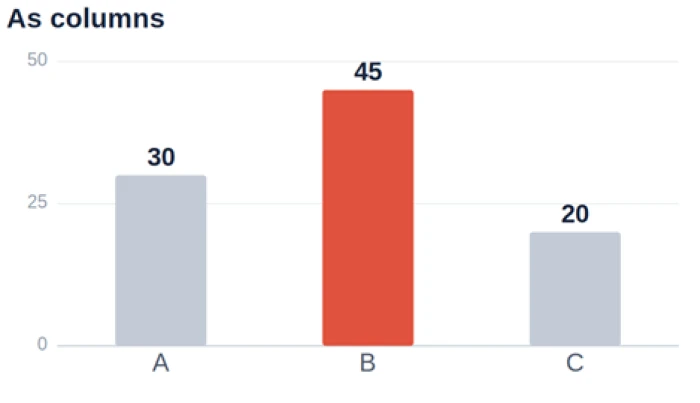 | 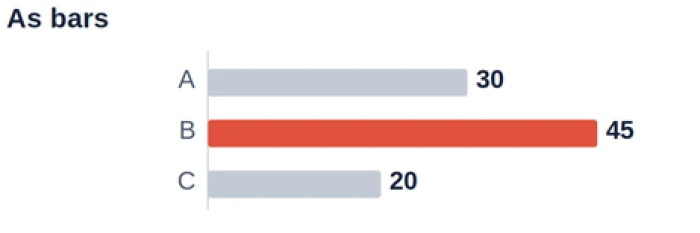 |
Identical data. On the left the categories run along the bottom and the bars grow upward. On the right they run down the side and the bars grow across. Nothing about the numbers changed, only the direction.
When a column chart is right
Reach for vertical columns when the horizontal axis is a sequence, especially time.
- Time on the bottom. Months, quarters, years. We read time left to right, so rising and falling columns feel like the story moving forward.
- A few short-labelled categories. Up to about seven items whose names fit under a column without turning sideways.
- The point is change. This period against that one, or a trend across a handful of steps.
When a bar chart is right
Turn the bars flat when you are ranking things or wrestling with labels.
- Rankings and top-N lists. Sorted longest to shortest, a horizontal bar chart reads like a leaderboard.
- Long category names. Product names, survey answers, full sentences. They sit comfortably on the left instead of being crammed or angled under a column.
- Many categories. Ten, fifteen, twenty. The list simply runs down the page rather than getting squeezed across it.
Column versus bar, at a glance
If you only keep one thing from this page, keep this table. It is the whole argument in a grid.
| What you are checking | Column chart | Bar chart |
|---|---|---|
| Orientation | Bars stand up, vertical | Bars lie flat, horizontal |
| Categories sit on | The bottom axis | The left axis |
| Values run | Up the side | Along the bottom |
| Reads best as | A change over time | A ranking, top to bottom |
| Ideal number of categories | About seven or fewer | Comfortable with many |
| Long category labels | Get cramped or angled | Sit flat and fully readable |
| Natural sort order | Chronological, left to right | Longest to shortest |
| Everyday example | Quarterly revenue | Top reasons in a survey |
| The thirty-second decision | |
| Is the bottom axis time, like months or quarters? | Columns |
| Are you ranking items, or are the labels long? | Bars |
| Neither clearly applies? | Either, pick the fit |
The mistakes that make either one lie
Both charts break in the same four ways. Get these right and the orientation almost stops mattering.
- Cutting the axis above zero. A bar's length is the value, so starting the axis at 40 instead of 0 turns a small gap into a cliff. Always start bars at zero. If you genuinely need a close-up of a narrow range, a line chart with a labelled axis is the honest way to show it.
- Leaving it unsorted. A ranking in alphabetical or random order hides the very thing a ranking is for. Sort it, largest to smallest.
- Rainbow colour. One series should be one colour. When you want a reader to look at a single bar, grey the rest and colour only that one, the way both charts above do.
- Rotated labels. If your category names only fit at a slant under a column, that is the data telling you to switch to horizontal bars.
More than one number per category
Plenty of real questions carry two or three numbers per category: this year against last, budget against actual, three regions across a few quarters. You have two clean ways to show that, and the choice depends on what you want compared.
- Grouped bars place the series side by side inside each category, so the reader compares them directly. Use this when the comparison between the series is the point.
- Stacked bars stack the series into one bar, so the total and its make-up show at once. Use this when the total matters and the split is secondary.
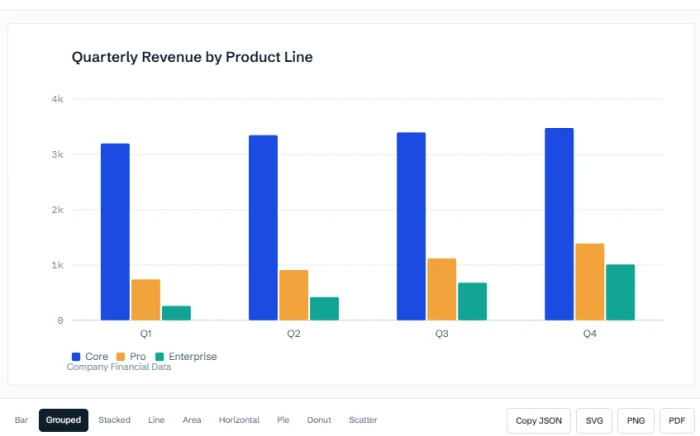
A grouped column chart. Two series sit side by side in every region, one colour each, so the eye compares this year against last within each group and across all of them at once.
One caution that catches people out. The moment you add a second series, colour stops being decoration and becomes the key to the chart. Give each series a single consistent colour and name them once in a legend, rather than colouring every bar a different shade.
When bars are the wrong tool entirely
Bars are for comparing separate categories. When the question has a different shape, another chart reads better, and forcing bars onto it is its own kind of mistake.
- Many points over time want a line, not columns. Twelve months as columns is fine. Two years of daily numbers is a wall of bars, and a line shows the trend without the clutter.
- Parts of a single whole can use a pie or a donut, but only with a few slices. Past about five parts, a sorted bar chart is easier to compare than wedges of similar size.
- The link between two measures wants a scatter plot, where each dot is one observation rather than one bar.
Make either one in seconds
None of this should require a fight with a chart wizard. The tedious part is not choosing between bars and columns, it is getting a zero baseline, a sensible sort and a single accent colour without clicking through five menus at eleven at night.
That is the gap ChartGPT is built for. You paste the numbers or describe the chart in a sentence, and it hands back a clean one with those defaults already applied, then lets you flip between a column and a bar with a word. See how ChartGPT works.