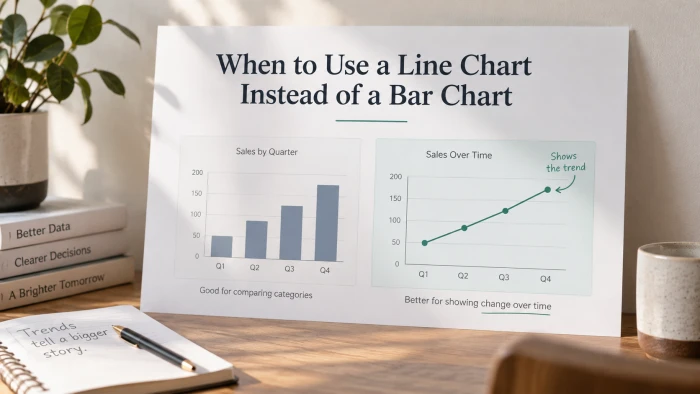
Most dashboards lean on the same two chart types. Picking the right one is the difference between a chart that shows numbers and a chart that explains them. Photo by Luke Chesser on Unsplash.
Open almost any dashboard and you will find bar charts and line charts doing most of the work. They are simple, familiar and quick to read, which is exactly why they get used so often. That familiarity has a cost. When both look like reasonable options, people tend to pick whichever one their tool offers first, and the chart ends up saying less than the data could.
Knowing when to use a line chart instead of a bar chart is not about taste. It comes down to one question about your data, plus a handful of situations where one chart does a job the other cannot. This guide walks through all of it, with three chart examples you can use as a reference for your own reports.
The short answer
Use a line chart when Your horizontal axis is time or another continuous measure, and the story is about how a value changes. The line shows movement. | Use a bar chart when Your horizontal axis is a set of separate categories, and the story is about which one is bigger. The bars show amount. |
If that already answers your question, skip to the checklist near the end. If you want to understand why the rule works, and where it bends, keep reading.
What each chart is built to do
A bar chart is a set of independent measurements. Each bar stands on its own, its length encodes a single value, and the gap between bars quietly says "these are separate things." Readers compare bar heights against each other and against the zero line. That is the whole job, and bars do it very well.
A line chart is different in one important way. Each point is still a measurement, but the line between two points adds a claim: the value travelled from here to there. The line encodes the path, not just the endpoints. Your eye follows the slope, notices where it steepens or flattens, and reads the overall shape as a single story.
A line chart makes a promise that the space between two points means something. Only use it when that promise is true.
This is why a line drawn across product categories feels wrong even if you cannot say why. There is no meaningful value between "Hardware" and "Training," so the line is drawing a path that does not exist.
The one question that decides it
Ask yourself: is the horizontal axis continuous?
• Continuous measures include time (hours, days, months, years), temperature, distance, age, price and dosage. Any value between two ticks on the axis is a real, possible value. These belong on a line chart.
• Categorical measures include products, regions, departments, campaigns, survey answers and customer segments. Nothing exists between two ticks. These belong on a bar chart.
Monthly revenue from January to December is continuous, so a line is a natural fit. Revenue by region is categorical, so bars are the right choice. The same metric can need different charts depending on what sits on the horizontal axis.

Time on the horizontal axis is the clearest signal that a line belongs on the page. Photo by Isaac Smith on Unsplash.
Five situations where a line chart is the better choice
You are showing change over time
This is the classic case. When the question is "how has this metric moved," a line answers it in a single glance. Bars can show the same numbers, but the reader has to compare each bar against its neighbour and mentally stitch the trend together. A line has already done that work.
The example below uses two full years of monthly data. Notice how a single line makes the seasonal dip and the long climb obvious. Twenty four bars would show the same values, but the shape would be harder to see.
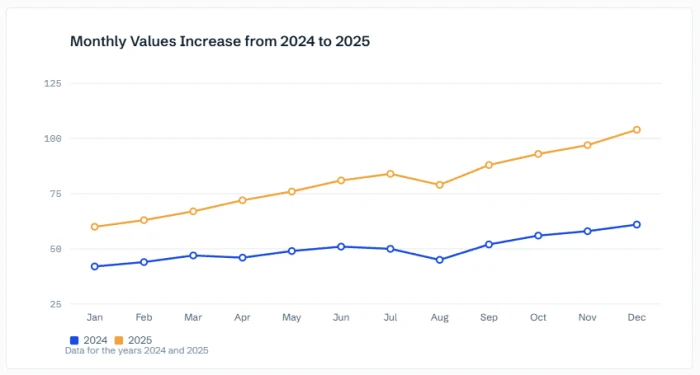 |
Chart 1. Monthly website sessions, January 2024 to December 2025
Line chart, one series, 24 monthly points. The line makes two things visible at once: a seasonal dip every August and a steady climb through 2025 that the August dip only briefly interrupts.
| This chart is based on the following details | ||||||||||||||||||||||||||||||||||||||||
| Chart type | Line chart with small point markers | |||||||||||||||||||||||||||||||||||||||
| Horizontal axis | Month, January 2024 to December 2025 (continuous, time) | |||||||||||||||||||||||||||||||||||||||
| Vertical axis | Sessions in thousands, starting at 0 | |||||||||||||||||||||||||||||||||||||||
| Series | One: total monthly sessions | |||||||||||||||||||||||||||||||||||||||
| What to highlight | The August dip in both years, and the fact that every other month in 2025 finished higher than the month before it | |||||||||||||||||||||||||||||||||||||||
| Data source | Sample data created for this article. Replace with your own analytics export. | |||||||||||||||||||||||||||||||||||||||
| ||||||||||||||||||||||||||||||||||||||||
You have many data points
Bar charts get crowded fast. Past about twelve bars, the labels start to collide, the bars become thin slivers and the reader loses the ability to compare anything. A line chart stays readable with 52 weekly points, 365 daily points or thousands of sensor readings, because it only needs to show the shape, not each individual value.
A useful rule of thumb: if you find yourself shrinking the font on the axis labels to make the bars fit, you probably want a line.
You are comparing several series over the same period
When you have three products, three regions or three channels measured over the same months, a grouped bar chart turns into a wall of colour. Three series over twelve periods means 36 bars, and the reader has to hunt for the matching colour in each cluster.
Three lines on one chart solve this. Each series keeps its own shape, the lines can be compared at any point along the axis, and crossovers, where one series overtakes another, become the most visible feature of the chart.
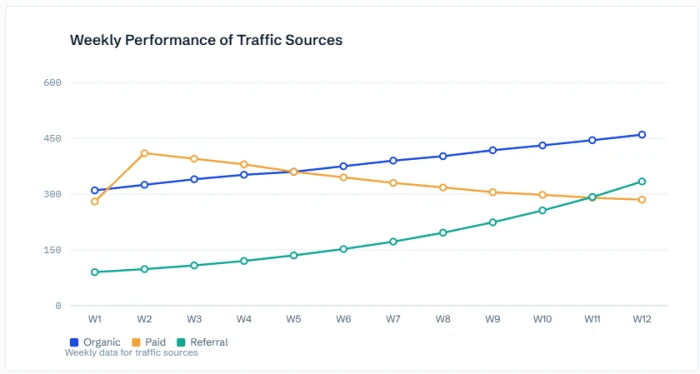 |
Chart 2. Weekly signups by channel over a 12 week campaign
Line chart, three series. Paid spikes at launch and then decays, organic grows steadily, and referral accelerates until it crosses paid in the final weeks. A grouped bar chart would need 36 bars to show the same story.
| This chart is based on the following details | |||||||||||||||||||||||||||||||||||||||||||||||||||||
| Chart type | Multi-series line chart with a legend | ||||||||||||||||||||||||||||||||||||||||||||||||||||
| Horizontal axis | Week 1 to Week 12 (continuous, time) | ||||||||||||||||||||||||||||||||||||||||||||||||||||
| Vertical axis | New signups per week, starting at 0 | ||||||||||||||||||||||||||||||||||||||||||||||||||||
| Series | Three: Organic, Paid, Referral | ||||||||||||||||||||||||||||||||||||||||||||||||||||
| What to highlight | The paid spike in week 2, and the point in week 11 where referral overtakes paid | ||||||||||||||||||||||||||||||||||||||||||||||||||||
| Data source | Sample data created for this article. Replace with your own campaign report. | ||||||||||||||||||||||||||||||||||||||||||||||||||||
| |||||||||||||||||||||||||||||||||||||||||||||||||||||
The rate of change matters more than the level
Sometimes the interesting part is not how big a number is but how fast it is moving. Is growth speeding up or slowing down? Did the curve flatten after the price change? Slope is something the eye reads instantly on a line and almost never on a set of bars. If the meeting is going to be about momentum, acceleration or plateaus, draw a line.
You want to reveal patterns
Seasonality, weekly cycles, inflection points and anomalies all show up as shapes. A line chart turns a year of data into a recognisable silhouette, so a repeating pattern jumps out and a sudden break from that pattern is impossible to miss. Bars break the silhouette into pieces, and the pattern goes with it.
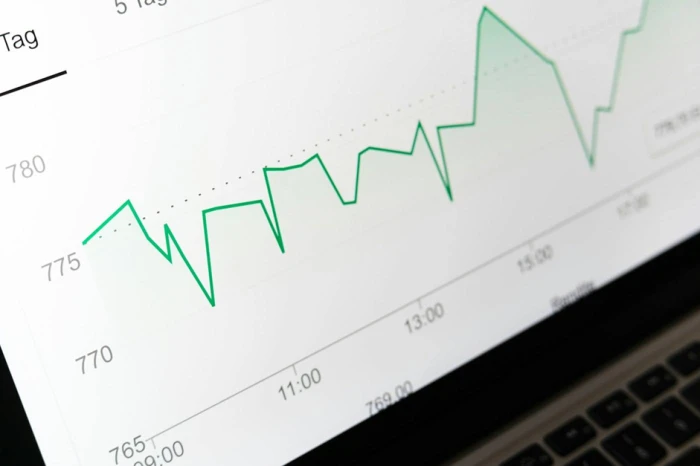
A line chart turns a long series of values into a shape the eye can read in one pass.
When a bar chart is still the right call
None of this makes bar charts second best. In several common situations they are clearly the stronger choice, and reaching for a line would make the chart worse.
You are comparing separate categories
Revenue by product, headcount by department, satisfaction by store. These are the bread and butter of bar charts. Sort the bars from largest to smallest and the reader gets a ranking for free. Never connect categories with a line, no matter how tidy it looks.
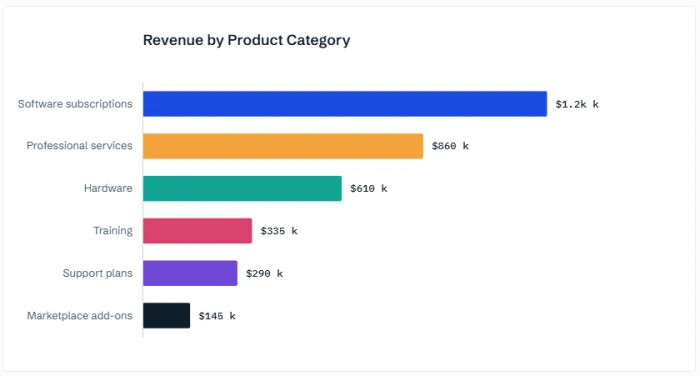 |
Chart 3. Annual revenue by product category, fiscal year 2025
Bar chart, six categories, sorted from largest to smallest. Each bar is an independent total, so the reader compares heights and reads the ranking without needing a trend.
| This chart is based on the following details | |||||||||||||||
| Chart type | Horizontal bar chart, single colour, sorted descending | ||||||||||||||
| Horizontal axis | Revenue in thousands of dollars, starting at 0 | ||||||||||||||
| Vertical axis | Product category (categorical, six values) | ||||||||||||||
| Series | One: total revenue for the fiscal year | ||||||||||||||
| What to highlight | Software subscriptions bring in more than the three smallest categories combined | ||||||||||||||
| Data source | Sample data created for this article. Replace with your own finance report. | ||||||||||||||
| |||||||||||||||
You only have a few periods and exact amounts matter
Four quarters, three years, two halves. With so few points, a line has almost no shape to show, and it can overstate how smooth the change was. Bars let the reader compare the four amounts directly, and they leave room for value labels on top. Once you get past eight or so periods, switch back to a line.
Your values cross zero
Profit and loss, net change, temperature above and below freezing. Bars grow up or down from the zero line, so positive and negative values are unmistakable. A line crossing zero is readable, but the bars make the direction of every single period obvious.
You need part to whole
Stacked bars show how a total splits into pieces, category by category. There is no clean line chart equivalent for a single period, and stacked area charts (the line version of a stack) are much harder to read accurately.
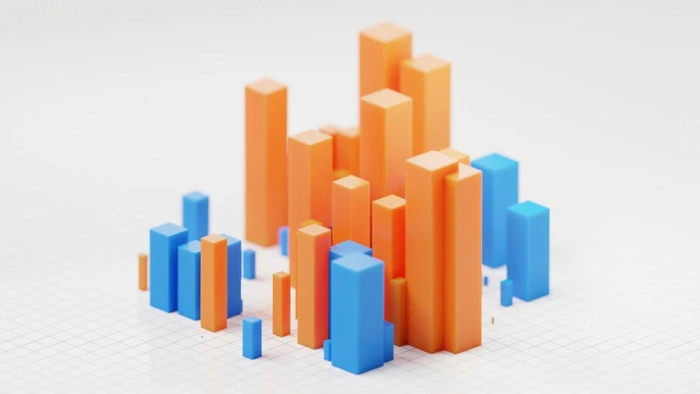
Bars are independent measurements. That independence is a feature when the categories are separate things.

A good dashboard mixes chart types, but each one should earn its place by matching the data it shows.
Mistakes that hurt both charts
• Lines across categories. The most common error. If the horizontal axis is a list of names, use bars.
• Bars that do not start at zero. Bar length is the value, so cutting the axis makes small differences look huge. Lines can use a narrower vertical range because the reader is judging slope, not length, but say so in the axis labels.
• Too many lines. Beyond four or five series, a line chart becomes a tangle. Split it into small multiples or highlight one line and grey out the rest.
• Smoothed curves. Curved interpolation invents values that were never measured. Keep the segments straight.
• Two vertical axes. A bar series on one axis and a line on another is a recipe for misreading. If you must combine them, label everything and keep the scales sensible.
Line chart vs bar chart at a glance
| Line chart | Bar chart | |
|---|---|---|
| Horizontal axis | Time or another continuous measure | Separate categories |
| Main question | How did this change? | Which one is bigger? |
| Comfortable point count | Ten to thousands | Two to about twelve |
| Several series | Up to four or five lines | Two or three grouped bars per category |
| Vertical axis must start at zero | No, but label it clearly | Yes, always |
| Negative values | Workable | Very clear |
| What the reader sees first | The shape and slope | The tallest and shortest bars |
A 30 second checklist
Run through these questions in order and stop at the first clear answer.
1. Is the horizontal axis a list of names or categories? Bar chart. 2. Is the horizontal axis time or another continuous measure with more than about eight points? Line chart. 3. Is it time, but with only a handful of periods and exact amounts matter? Bar chart. 4. Are you comparing several series over the same period? Line chart, up to four or five series. 5. Is the point to show slope, momentum or a repeating pattern? Line chart. 6. Do values cross zero, or do you need a ranking? Bar chart. |
The rule in one sentence
Before you build your next chart, ask what the space between two points means. If it means "time passed and the value moved," draw a line. If it means nothing at all, draw bars.
If this guide helped, pass it on to someone who is about to draw a line through five product categories.